How to opt in to class texts
Effective September 21, 2026
Choose your notifications
- Sign in and open My Calendar.
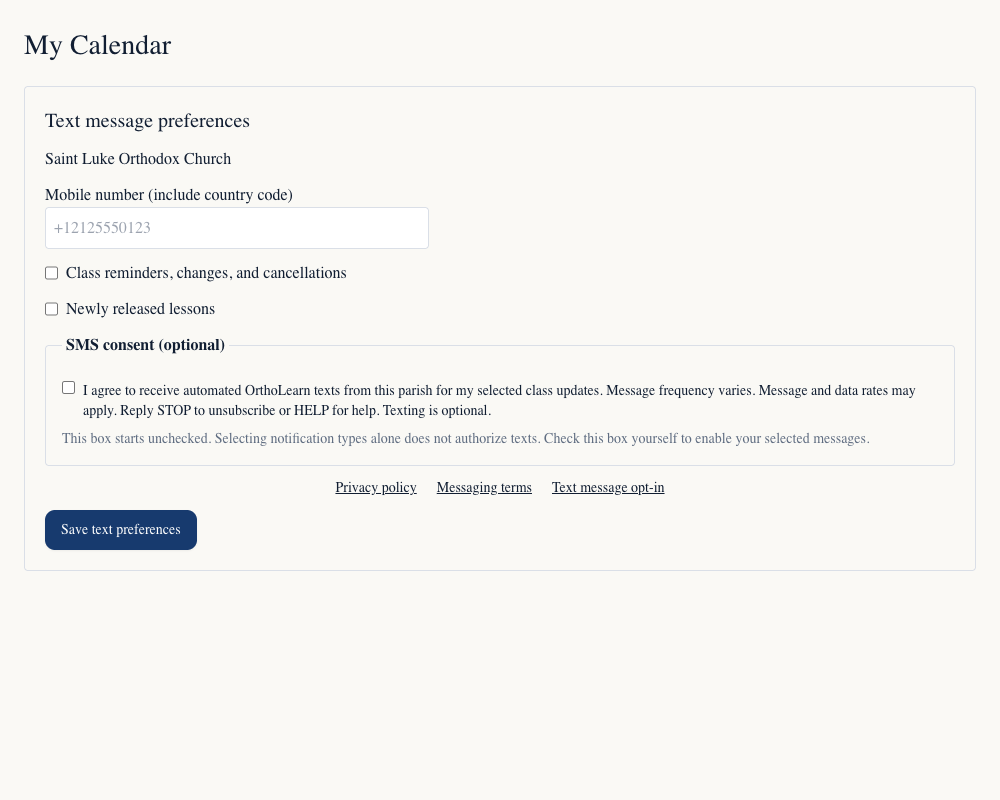
- Find Text message preferences and enter your mobile number, including country code.
- Choose class reminders, changes and cancellations, newly released lessons, or both.
- Read the disclosure and linked policies, actively check the consent checkbox, then select Save and consent to texts.
Texting is optional. Having an account or providing a number does not automatically subscribe you. Message frequency varies. Message and data rates may apply. Reply STOP to unsubscribe or HELP for help.
Consent form
This screenshot shows the form used in My Calendar in its initial state: the mobile number is blank, both notification choices are unchecked, and the separate SMS consent checkbox is unchecked. Signing in is required to save preferences; this public page does not collect phone numbers.
Invitations
A class invitation requires separate permission before staff send it. Staff record when and how permission was given. An invitation does not subscribe the recipient to recurring messages.